Showing posts with label step. Show all posts

Thursday, March 9, 2017

WhatsApp Brings Two Step Verification On Android How To Enable

WhatsApp Brings Two Step Verification On Android How To Enable


WhatsApp is rolling out two-step authentication for beta users on Android in order to avoid hacking attempts. Here’s how you can enable it.
WhatsApp Brings Two-Step Verification On Android: How To Enable

WhatsApp is already rolling out lots of new features. Recently we have seen WhatsApp launched video call feature for beta users on Android. Now, WhatsApp is rolling out two-factor authentication for Android users.
The two-factor authentication feature is live in the most recent beta version of WhatsApp app (2.16.341 and above). According to Android Police, the feature has also been spotted on the Windows Phone beta.
This two-factor authentication feature prompts a user for a static six-digit passcode every time you register any new phone to the existing account. This feature is beneficial because it can provide defense against criminals who might try to clone your phone.
Earlier, SMS confirmation was the only way to register existing WhatsApp account to any new device and the SMS could be sent to all devices registered on your phone. Therefore, two-factor authentication provides a crucial line of defense against criminals.
To enable two-factor authentication, users need to sign up for a beta version from Google Play store. Open WhatsApp page in Google Play store and keep scrolling down and you will find an option “Sign-in as the beta tester” simply tap on “I’m in” and wait for few minutes.
Step 1. After having a beta app, head over to your account settings in WhatsApp.


Enable Two-Step Verification on WhatsApp
Step 2. Now tap on “Two-Step verifications” and tap on “Enable”
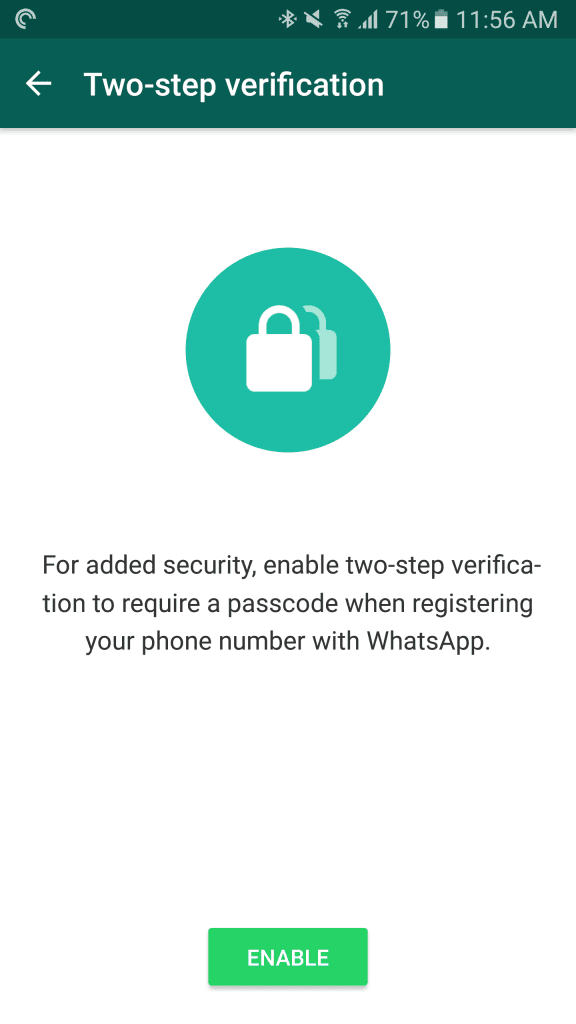
Enable Two-Step Verification on WhatsApp
Step 3. Now you need to enter a six-digit password which you’ll be asked for when you register your phone number with WhatsApp.
Enable Two-Step Verification on WhatsApp
Step 4. Next, you need to add an email address to your account which can be used to reset your password in case if you forget it.
Enable Two-Step Verification on WhatsApp
That’s it! Now Two-step verification is enabled. Now you need to enter the passcode every time you register WhatsApp with the new device.
Enable Two-Step Verification on WhatsApp
So, this is how you can enable two-step verification in your WhatsApp account. It will work as an extra security. If you are facing any issue activating two-step verification then discuss with us in the comment box below.

Go to link download

Read more »

Thursday, March 2, 2017

Download Aplikasi Android USMLE Step 1 Path Flashcards v2 47 apk

Download Aplikasi Android USMLE Step 1 Path Flashcards v2 47 apk


Download Aplikasi Android USMLE Step 1 Path Flashcards v2.47.apk


Download Aplikasi Android Terbaru - were are the topics and flashcards included in this program:

Inflammation: 126 flashcards 
Acid/Base Blood Gas:38 flashcards 
Nutrition and Disease: 140 flashcards 
Clotting: 134 flashcards 
Cellular Changes: 48 flashcards 
Cell Cycle: 62 flashcards 
Cellular Injury: 118 flashcards 
Fluid Shifts: 161 flashcards 
Hematology: 375 flashcards 
GI: 365 flashcards 
Kidney: 164 flashcards 
Urology: 51 flashcards 
Gynecology: 125 flashcards 
MSK: 98 flashcards 
Skin: 31 flashcards 
Neuro: 75 flashcards 
Cardiology: 322 flashcards 
Respiratory: 226 flashcards 
Cancer: 196 flashcards 
Endocrine: 205 flashcards
Total # of Questions:3060

The cards were created by students and now physicians who scored a 240 or higher on their USMLE Step 1.

The program itself offers various features and options for a great and convenient learning environment which include:

- Ability to Randomize cards 
- Can Flag cards for later use 
- Grade cards by using gestures 
- Study only missed cards, only new cards, only correct cards, flagged cards, or study all cards 
- Study all categories or selected categories 
- Timed mode to automatically flip card and advance cards. 
- Ability to edit and delete cards 
- Convenient statistics panel to see progress 
- Can change background color and text color 
- Can change text size 
- Can see back of card first

You can try out our Lite version to see the features and how to use the program.

Whats New? : Format corrections.


DOWNLOAD

Go to link download

Read more »